Earmark
> Earmark.play(yourFiles, inPlace: true)
An iPhone audiobook player for people with folders full of MP3s and M4Bs. It plays your files where they are, in Files, iCloud Drive, or on your NAS, keeps them organized, works in the car, and never asks you for money.
// Your audiobooks. Your files. No tip jar.
[PROJECT_METRICS]
[WHY_EARMARK]
Most players want you to import files one at a time, quietly duplicate them into their own sandbox, and interrupt you with donation screens. Earmark does none of that.
You pick a folder. Earmark keeps a security-scoped bookmark and reads in place. Your library stays exactly where you put it, so the same files work in Files, on your NAS, and in any other app.
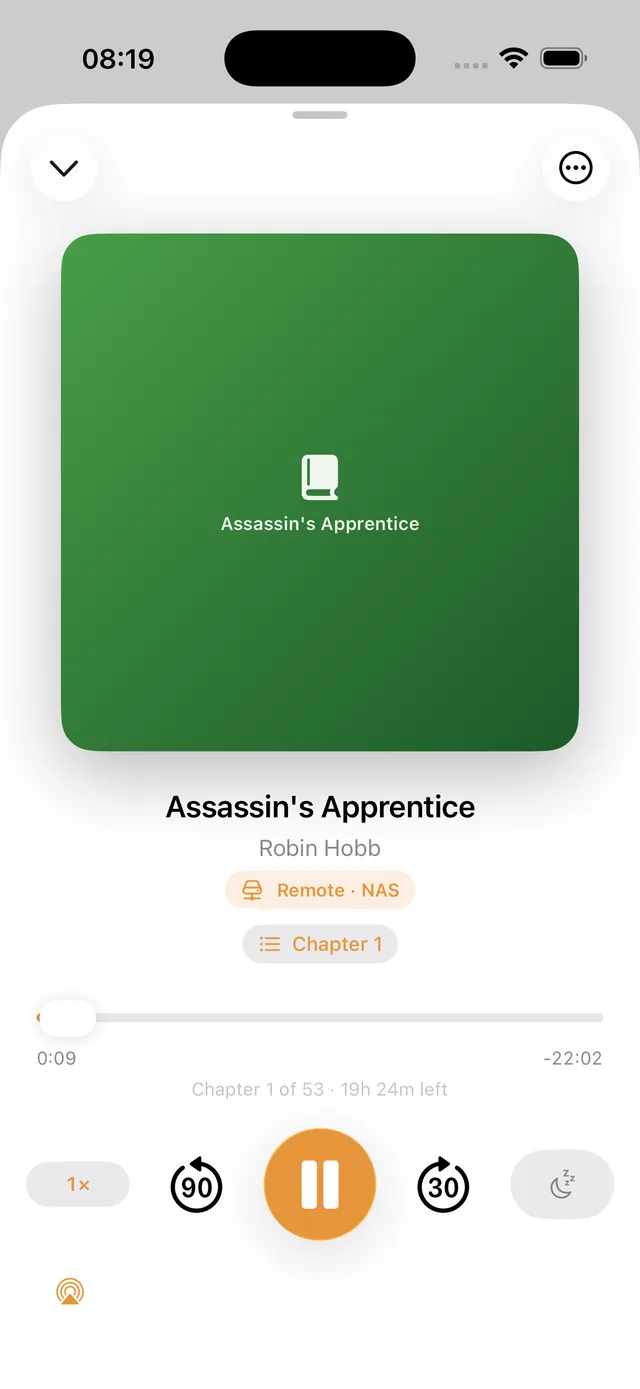
Books on a NAS stream over SMB while you are on your home network and carry a clear Remote badge. Download the ones you want offline, or sync everything that is not on the phone yet.
[FEATURES]
Point Earmark at a folder in Files, iCloud Drive, or another app. It reads in place. Nothing is copied or moved.
A folder of MP3s is a book, every M4B is a book, Disc 1/Disc 2 folders merge, and Author/Series/Book trees (or tags) fill in the rest.
Every file is fingerprinted by content, so identical books in two places are found even when the names differ.
0.5x to 3x with natural pitch, remembered per book, one tap from the player or the lock screen.
Chapters, 15/30-second skips, sleep timer with end-of-chapter, and smart rewind after a pause.
Full Now Playing controls on the lock screen and in the car, plus a CarPlay app with Continue and Library tabs.
Add an SMB share and its books appear on your shelf with a Remote badge. Clear message when you are off your home network.
Download one book or everything that is not on your phone yet. Local copies take over automatically.
A yearly goal ring, books-per-year chart, ratings, and most-read authors. Import years of reading history so it all counts.
Race through the silent gaps to finish a book sooner, and lift quiet narration with a limiter so it never clips. Both work on streamed books too.
Save a spot with one tap, add a note, and jump back to it later from the player.
The upload side of sync: push books on your phone back up to the share, one at a time, skipping anything already there.
Listening position, finished state, ratings, and your reading log follow you across iPhone, iPad, and CarPlay over iCloud.
A Continue Listening widget for the Home and Lock Screen, and “Resume my audiobook” through Siri and Shortcuts.
When a tag is wrong, edit the title, author, or series by hand — only the fields you change are kept, so a rescan still improves the rest.
No accounts, no analytics, no ads, no donation screens. Free and open source, forever.
[SCREENSHOTS]
[TECH_STACK]
// Local files: security-scoped bookmarks, AVFoundation tags and chapters, content-hash duplicate detection.
// NAS: SMB via AMSMB2, streamed into AVFoundation through a custom resource loader, tags read from file headers.
// Ships from Xcode Cloud to TestFlight on every push to main.